

Introduction to Player Evaluations
Player evaluations sit at the center of player development, roster decisions, and coach-player communication.
Yet most evaluation methods fall short. Paper forms get lost. Spreadsheets lack context. Generic digital tools force every team into the same rigid structure. As a result, coaches spend time recording feedback without gaining meaningful insight.
Our Player Evaluation system solves this by giving coaches a flexible, development-focused way to evaluate players inside the same platform they already use for playbooks, messaging, and scheduling.
This powerful tool helps you build consistent, flexible, and position-aware evaluations in the same place that you manage the rest of your team’s playbook, communications and team schedule.
Player Evaluations are available to coaches on the Complete and Collegiate tiers.
Why it Matters
Every coach evaluates differently – and that’s the point.
One might emphasize speed and agility. Another may prioritize effort and IQ. You might need different evaluation templates for tryouts, mid-season check-ins, or end-of-season reviews.
A meaningful evaluation system must adapt to how you coach, not force you into a one-size-fits-all model.
This system gives you control without forcing you to rebuild your process every time.
What You Can Do with the Player Evaluation Tool
Player Evaluations let you define what matters, measure it consistently, and track development over time. All without extra tools or manual work.
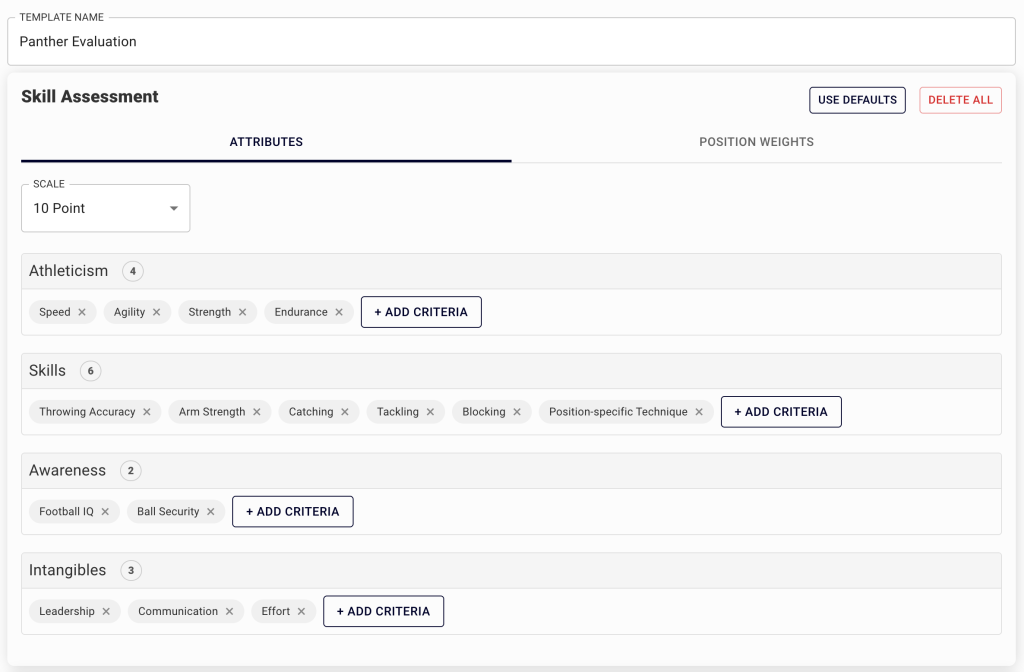
1. Build Custom Evaluation Templates
-
Create templates based on your coaching philosophy and team culture.
-
Add or remove attributes to match your sport and level
-
Reuse templates across seasons, teams, or coaching staffs
Example: A football coach might create different forms for linemen vs. quarterbacks. A lacrosse coach could build a goalie-specific template.

2. Weight Attributes by Position
Stop evaluating every player the same way. Assign custom weights to attributes based on each player’s position so scores reflect what actually matter on the field or court.
-
Basketball: Prioritize “Ball Handling” and “Vision” for guards, “Rebounding” and “Post Play” for forwards.
-
Football: Make “Blocking” and “Strength” central to linemen, while DBs get more weight on “Speed” and “Agility.”
-
Lacrosse: Adjust for attackers, midfielders, defenders, and goalies individually.
This position-aware approach produces a single, normalized score while respecting the realities of each role.

3. Add Measurable Performance Data
Pair coach observations with objective data to create a complete evaluation. Track measureable performance indicators such as:
-
40-yard dash time
-
Shooting percentage
-
Vertical jump
-
Max bench press
-
Reaction drills
Combining skill assessments with performance data helps you track progress, validate improvement, and identify long-term potential.
4. Leave Summary Notes
Every evaluation includes a free-form summary section where you can capture context, observations, and next steps.
Use AI-generated summaries to quickly highlight strengths, growth over time, and development priorities before the next evaluation.
5. Fully Integrated Team Management
Player Evaluations connect directly to the rest of your team data. Each evaluation automatically incorporates practice attendance and playbook usage, giving you the context needed for meaningful development conversations.
This integrated view helps coaches move beyond isolated scores and focus on the full player picture.
6. Share Evaluations with Players and Parents
Share completed evaluations directly with players and parents to support transparency, motivation, and productive development conversations.
Who Gets Access?
Player Evaluations are available to coaches on the Complete and Collegiate plans across all products.
Not sure which plan you’re on? Log into your Football Lab, Lacrosse Lab, or Hoops Lab account to find out.
Ready to Get Started?
Manage Evaluation Templates from Team Settings, or start an evaluation directly from a player’s profile. Create a custom template or use a default to get started immediately.
Final Word
Player Evaluations help coaches:
-
Stay organized
-
Save time
-
Communicate more clearly
-
Make better development decisions
We built this system for coaches who want evaluations to drive improvement, not just record information.
Player Evaluations: Frequently Asked Questions
What is the new Player Evaluation feature?
It’s a customizable tool that allows coaches to score players based on position-specific attributes, track objective performance metrics, integrate event attendance and platform usage to share with player or parents, all in one structured system.
Who can use the Player Evaluation tool?
The feature is available for users on our Complete and Collegiate plans. If you’re on a Basic or Personal tier, you’ll need to upgrade to access it.
Can I create my own evaluation template?
Yes! You can build evaluation templates from scratch or use our sport-specific presets. You choose the attributes, decide their weight, and save the form for future use.
Can I weight skills differently for each position?
Absolutely. For example:
-
A football linebacker can be scored more heavily on “Tackling” and “Effort”
-
A basketball point guard might be evaluated based on “Vision” and “Ball Handling”
-
A lacrosse defender could prioritize “Agility” and “Positioning”
This ensures players are evaluated based on the demands of their position.
Can I track objective measurables like sprint times or bench press?
Yes. The Performance Metrics section lets you input objective data like:
-
40-yard dash time
-
Vertical leap
-
Shot speed
-
Shooting percentage
-
Conditioning test results
You can customize this section to fit your sport and level.
Can I share evaluations with players or parents?
Yes. Once an evaluation is completed, you can choose to share it directly with athletes or their parents. This is optional and great for development conversations or tryout transparency.
Can I access evaluations from past seasons?
Yes, all evaluations you complete are saved and accessible from your account. You can filter by team, player, season, or evaluation type.
Our AI-generated summary even automatically considers past evaluations in its analysis of a player.
How do I get started?
Evaluation Template Management is available in your Team Settings under your profile. Or, jump straight into your first evaluation by navigating to the Evaluations tab in a player’s roster profile.
Can I use this for tryouts or mid-season reviews?
Of course, it’s designed to be flexible. Many coaches use on template for tryouts, and another template for mid-season and postseason evaluations.